
NOTE
4.1 Redis Cluster
1. Why Redis Cluster is needed - Distributed system partitioning 2. What Redis Cluster is - Redis's distributed solution, solving the single-machine write-capacity limit of primary-replica replication and the lack of automatic failover 3. How to build a Redis Cluster
This is a historical learning note and may contain outdated or incomplete understanding.
1. Why Redis Cluster Is Needed
2. What Is Redis Cluster?
- Redis’s distributed solution. It solves the problems that write capacity in primary-replica replication is limited by one machine and that automatic failover cannot be performed.
3. How to Build a Redis Cluster
A cluster can have multiple masters, and each master can have multiple slaves. Usually 3+3=6 machines are needed.
3.1. Manual Setup
3.1.1. Configure and Start Cluster Mode
redis7000.conf
daemonize yes
bind 127.0.0.1
port 7000
dir "/home/user/software/redis/redis-cluster/data"
logfile "7000.log"
dbfilename "dump7000.conf"
cluster-enabled yes
cluster-config-file nodes-7000.conf
cluster-require-full-coverage no
cluster-config-file is created by the Redis instance; we do not need to create it ourselves.
redis*.conf
sed "s/7000/7001/g" redis7000.conf > redis7001.conf
sed "s/7000/7002/g" redis7000.conf > redis7002.conf
sed "s/7000/7003/g" redis7000.conf > redis7003.conf
sed "s/7000/7004/g" redis7000.conf > redis7004.conf
sed "s/7000/7005/g" redis7000.conf > redis7005.conf
sed "s/7000/7006/g" redis7000.conf > redis7006.conf- Start
bin/redis-server conf/redis7000.conf
bin/redis-server conf/redis7001.conf
bin/redis-server conf/redis7002.conf
bin/redis-server conf/redis7003.conf
bin/redis-server conf/redis7004.conf
bin/redis-server conf/redis7005.conf
bin/redis-server conf/redis7006.conf
After startup, output similar to [82462] 26 Nov 11:56:55.329 * No cluster configuration found, I'm 97a3a64667477371c4479320d683e4c8db5858b1 appears. Each node has a nodeId, which is used for communication between nodes.
3.1.2. Handshake
bin/redis-cli -p 7000 cluster meet 127.0.0.1 7001
bin/redis-cli -p 7000 cluster meet 127.0.0.1 7002
bin/redis-cli -p 7000 cluster meet 127.0.0.1 7003
bin/redis-cli -p 7000 cluster meet 127.0.0.1 7004
bin/redis-cli -p 7000 cluster meet 127.0.0.1 7005
bin/redis-cli -p 7000 cluster meet 127.0.0.1 7006
3.1.3. Assign Slots
#/bin/bash
start=$1
end=$2
port=$3

for slot in `seq ${start} ${end}`
do
    echo "slow:${slot}"
    bin/redis-cli -p ${port} cluster addslots ${slot}
done
sh ./addslots.sh 0 5461 7000
sh ./addslots.sh 5462 10922 7001
sh ./addslots.sh 10923 16383 70023.1.4. replication
- slave
# Use the following command to get the runid
bin/redis-cli -p 7000 cluster nodes

bin/redis-cli -p 7003 cluster replicate cf302160bacc05ce1131462b0d6fd727c498a6e9
bin/redis-cli -p 7004 cluster replicate a0c58fe607a57f31fd2f31f9f64bcd72ca200bb2
bin/redis-cli -p 7005 cluster replicate be55251b5ca4e5441cac8415e381e501644613ca
3.1.5. Client Usage
bin/redis-cli -c -p 70003.2. Script-Based Setup
./redis-trib.rb create --replicas 1 127.0.0.1:6379 127.0.0.1:6380 127.0.0.1:6381 127.0.0.1:6382 127.0.0.1:6383 127.0.0.1:63844. Redis Cluster Principles
4.1. Partitioning
Distributed System Partitioning
4.1.1. Split Data
4.1.1.1. Choice of Split Key
Redis itself is a key-value database, so naturally the key is used for partitioning.
4.1.1.2. Data Partitioning Strategy
Slot partitioning.
4.1.2. Data Reads and Writes
4.1.2.1. Routing Component
- server
MOVEDredirection: after Redis receives a key, it calculates the slot and the node corresponding to that slot. If it is the current node, the command is processed; otherwise Redis replies with aMOVEDredirect, telling the client to request the correct node.
- client
- Smart client: maintains a
slot -> nodemapping internally and can look upkey -> nodelocally.MOVEDredirection helps the smart client update itsslot -> nodemapping.
- Smart client: maintains a
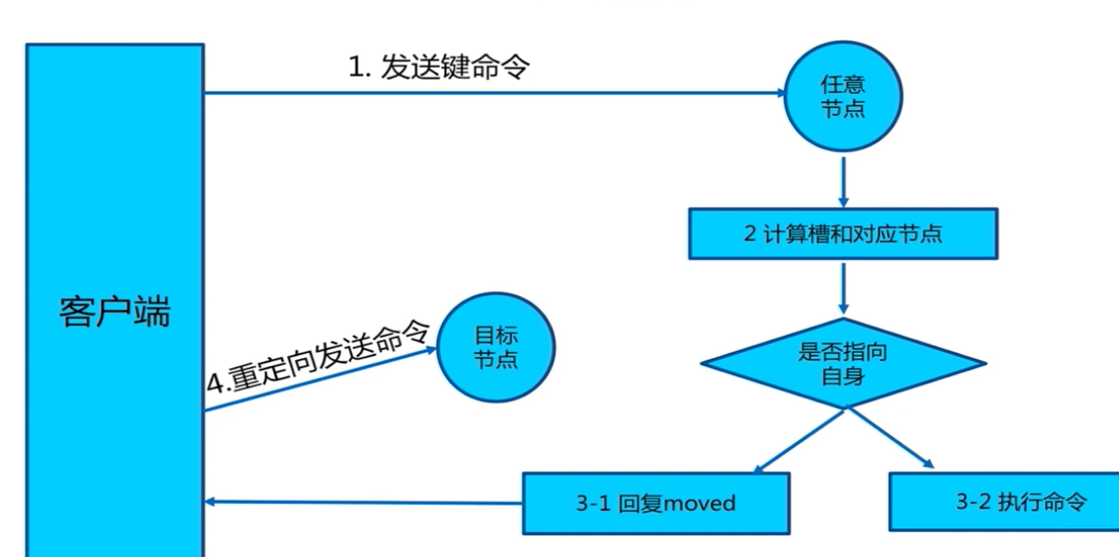
4.1.2.2. Routing Process
A key is mapped to a slot using CRC16(key) % 16384, which determines the node on which it is stored.
4.1.2.3. Partition Assignment
Redis Cluster has 16,384 hash slots for storing data, and each node is responsible for a subset of the slots.
4.1.3. Partition Rebalancing
Slots move between nodes.
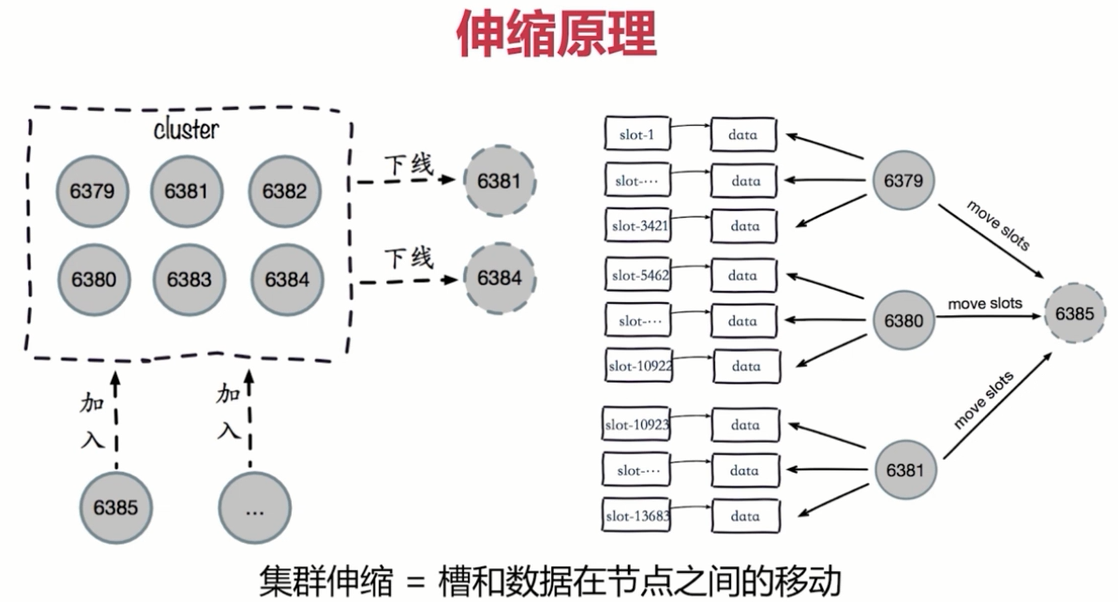
4.2. Primary-Replica Replication
4.2.1. Leader Election
Same as Redis Replication.
4.2.2. Request Processing
Same as Redis Replication.
4.2.3. Failure Handling
4.2.3.1. Failure Detection
Distributed Consistency Algorithm: Gossip
- Each node periodically selects several nodes and sends
pingmessages. Nodes that receive apingrespond with apong. - Subjective failure: if a slave node does not receive a
pongfrom a master for a period of time, it considers the master down; this is subjective failure. - Objective failure: after subjective failure, the information propagates through the cluster. If more than half of the master nodes consider it down, this becomes objective failure.
4.2.3.2. Failure Recovery
4.2.3.2.1. slave failure
Reconnection after a slave failure is the same as Redis Replication.
4.2.3.2.2. master failure
- Slaves initiate voting. If more than half of the masters agree, one is elected master.
- Distributed Consistency Algorithm: Raft
5. Problems with Redis Cluster
- Multi-key operations are usually not supported across different slots.
- If two sets are stored in keys mapped to different Redis instances, an intersection between the two sets cannot be performed directly.
- Redis transactions involving multiple keys cannot be used across different slots.
5.1. CROSSSLOT Keys in request don't hash to the same slot
You can add {} to the key. When a key contains this pattern, only the substring between { and } is hashed to obtain the hash slot.
[redacted internal address]:6379> CLUSTER KEYSLOT {user1}:myset
(integer) 8106
[redacted internal address]:6379> CLUSTER KEYSLOT {user1}:myset2
(integer) 8106

[redacted internal address]:6379> SUNION {user1}:myset {user1}:myset2
1) "some data for myset"
2) "some data for myset2"
6. References
- Ubuntu 16.04 Redis 编译安装及设置详解 - 简书
- redis编译报错cc: error: ../deps/jemalloc/lib/libjemalloc.a: No such file or directory_数据库_L_congcong的博客-CSDN博客
- Redis5 Cluster搭建及常用命令 - 掘金
- 关闭禁用 Redis 危险命令 - leffss - 博客园
- 排除 ElastiCache 错误“CROSSSLOT Keys in request don’t hash to the same slot(无法将请求中的 CROSSSLOT 密钥哈希写入同一槽中)”
- Redis cluster tutorial – Redis
- Redis Cluster Specification – Redis
- 018.Redis Cluster故障转移原理 - 云+社区 - 腾讯云
- Raft协议(1)——Raft协议与Redis集群中的一致性协议的异同 - 知乎
- Redis Cluster Specification – Redis
- 算法高级(18)-Redis Cluster选举机制_十步杀一人-千里不留行-CSDN博客_redis集群选举机制
Discussion
Sign in with GitHub to comment. Discussions are stored as GitHub Issues.View on GitHub